Best Matches
Find an Old National Location
Looking for a convenient banking center near you? Our branch locator can help. You can also look up hours and search for surcharge-free ATMs.
2,491 results found
-
Consumers Pulled Back on Shopping in October. Are Your Holiday Projections Still Safe?
Retailers are getting mixed signals from consumers ahead of the holidays--here's what you can expect. Americans pulled back on spending in October,
-
HSA Contribution Limit Rising Again for 2025
New HSA contribution limits for 2025: What you need to know.
-
Potential First-Time Homeowners Can Celebrate Homeownership Month with Old National's HOP Program
By Jamie Herman, Mortgage Sales Manager, Old National Bank National Homeownership Month is a time to recognize the importance of owning a home.
-
Real-Life Finance Podcast #12 | Tech That Teaches
Hosted by Old National Bank Financial Empowerment Director Ben Joergens, each Real-Life Finance episode focuses on everyday financial solutions that
-
Real-Life Finance Podcast #1
Hosted by Old National Bank Financial Empowerment Director Ben Joergens, each Real-Life Finance episode focuses on everyday financial solutions that
-
Personal Loan Selector
The Old National personal loan selector helps you decide the best way to borrow money. Answer a few questions for a suggested loan type that may fit your needs.
-
Mortgage Loan Selector
The Old National mortgage loan selector helps you choose the right option. Answer a few questions for a suggested mortgage type that matches your needs.
-
How do you write a check?
To write your check, fill out the fields carefully and sign at bottom right. We’ve included a properly filled out check below, as an example.
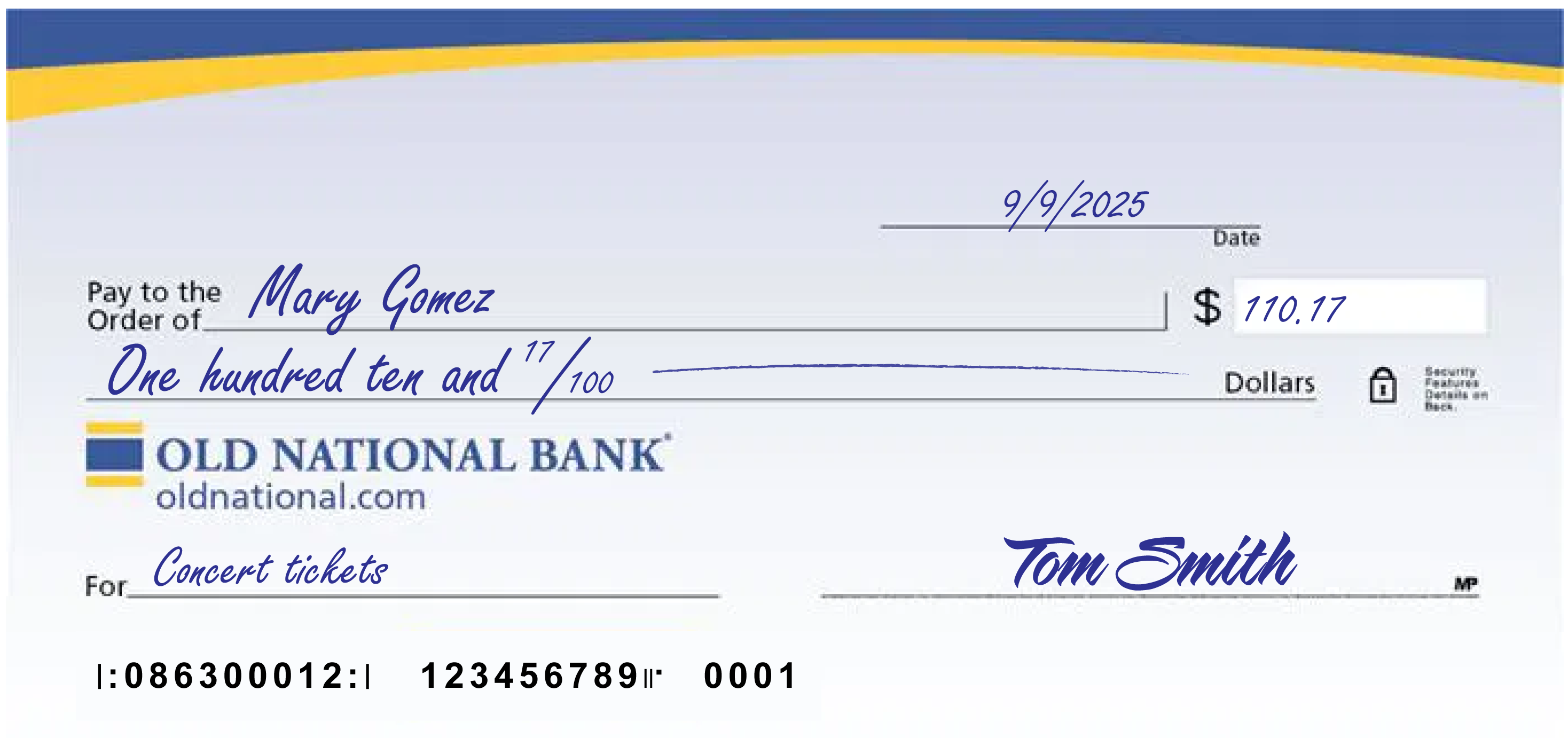
A few notes:
- The date at the upper right can be any standard format that includes the day, month and year.
- Write the full name of the person, business entity, or organization who is receiving the check in the “Pay to the Order of” field.
- The box at the right is for a numerical representation of the amount you’d like to pay the recipient.
- The line with “dollars” at the end is where you write out the amount you’d like to pay the recipient in words; write the cents as a fraction XX/100; if there’s extra space, draw a line until “dollars” so that no one can adjust the amount you wrote.
- The lower left field is for personal notes; this is optional. Some people like to write what the check is for, so they can remember when reviewing their records; If you’re paying a specific bill, you may be asked to write your invoice number or other identifying information you have on record with the company you’re paying.
- Sign the check at lower right with the signature that you use for all important documents.
- If you make a mistake on your check, you can cross it out and put your initials next to it and then write what you meant to write.
-
Why am I receiving calls regarding my loan account being past due when I have a grace period?
The grace period on your loan doesn't provide additional time beyond the due date to make a payment. The grace period only provides additional time before a late charge is assessed. If we don't receive your payment by the due date, it is considered late, and you may receive correspondence by phone or mail regarding the status of your payment.
-
How do I sign up for Online Bill Pay within Digital Banking?
Bill Pay is a free service that enables you to pay your credit card bill, cell phone bill, mortgage payment, utilities, individuals or really any bill you want to pay. Payment is taken directly from your Old National account. It's easy to begin using Online Bill Pay:
From a web browser
- Log in to Digital Banking
- Choose Pay or Transfer, then choose Bill Pay in the top menu
- You may need to enter a few pieces of identification, otherwise, review and check the box agreeing to the Terms & Conditions
- Click Complete Sign Up
- Begin adding information for the business or person you want to pay
Within Digital Banking, you can make one-time payments and set up automated, repeat payments. You can also enroll to receive eBills (electronic bills) from payees with Bill Pay and view your eBills history.
Please note: Depending on the party you are paying, payments may be sent electronically or a physical check will be produced and mailed.Our Bill Pay has its own FAQ as well. You can find it on the Bill Pay screen in the lower right corner under I want to. . .
In the Mobile App
- Open the Mobile App
- Choose Pay & Transfer, then choose Bill Pay
- Select Payees at the top right of the screen
- In the Add a person or business field begin adding information for those you want to pay
If you need assistance with enrolling in Bill Pay, please contact Client Care at 1-800-731-2265.