201 results found
-
To submit a notice of error or request for information about my loan, do I have to write a letter, or can I instead call Old National or visit a banking center?
We are happy to continue to service your account through email, phone and our banking centers. However, we encourage you to submit any notices of error or requests for information in writing to:
Old National Bank
Attn: Client Success
P.O. Box 143
Evansville, IN 47701Written communication ensures that you receive all the protections under the Real Estate Settlement Procedures Act (RESPA).
-
Where should I send a notice of error or request for information about my loan?
Please mail all notices of error or requests for information about your Old National loan to:
Old National Bank
Attn: Client Success
P.O. Box 143
Evansville, IN 47701 -
Why is my request for Digital Banking access showing as declined or pending?
When you complete the Digital Banking enrollment process, we must verify the information you provide in order to prevent any unauthorized access to your account. The security of client information is one of our highest priorities. If your request for Digital Banking has been declined, it most likely means we were not able to successfully verify the information you provided during the enrollment process. A pending status most likely means we are working to verify your information. We will email you to notify you when your Digital Banking enrollment request is approved or declined.
If you have questions or concerns about your Digital Banking enrollment, please call Client Care at 1-800-731-2265, and one of our associates would be happy to assist you.
-
What should I do if I forgot my User ID or Password for Digital Banking?
Your user ID and Password for Digital Banking and the Mobile App are the same. If you have forgotten your User ID and Password, you can do one of the following:
- On a computer or other device, go to the home page. Go to the blue Login box on the upper right side of the page. Click on Forgot User ID or Password. You will be asked to provide information to receive a temporary password or click I forgot my user id.
- If you are using the Mobile App, on the Login screen, tap Forgot Login. Enter the requested information to receive a temporary password or tap I forgot my user id.
- If, after trying the above, you are not able to retrieve or reset your password, please call Client Care at 1-800-731-2265, Option 3, for login assistance.
Please note, when requesting or resetting your User ID or Password, you will be asked to enter your email or phone number. For security purposes, the email or phone number must match the email or phone number you have provided for your account. Additionally, resetting your User ID or Password disables your biometrics. To enable, within your app navigate to "More" and access your settings.
-
Can I use ATMs that are not Old National or Allpoint ATMs?
Yes. Your Old National ATM/debit card will work at all ATMs. However, doing so may result in several fees.
Surcharge fees
Out of network ATMs (ones that are neither Old National nor Allpoint) may assess you a surcharge fee. An ATM surcharge fee is the fee an owner of an ATM charges cardholders from other financial institutions who use their machine. In other words, if you have an Old National debit card and use it at another bank's ATM, that bank may assess a surcharge.Foreign fees
For most types of checking accounts, Old National will charge a $3.00 "foreign" ATM fee (on top of any ATM owner surcharge) if you use a non-Old National Bank or non-Allpoint ATM.To ensure fee-free ATM usage, we recommend always using an Old National or Allpoint ATM when possible. To find an Old National or Allpoint ATM, go to our website locator at oldnational.com/locations. Select the "ATM" and "Allpoint Surcharge-Free ATM" filters. You can also use the locator within our Mobile App to find both Old National and Allpoint ATMs.
-
What if I used my debit card at a business or merchant that was breached?
What you need to know:
Unfortunately, merchant breaches happen from time to time but you can feel confident that Old National is protecting the security of your accounts. Old National monitors for unauthorized and suspicious activity.Things you can do to help guard against unauthorized use of your debit card:
- When using your debit card, choose “CREDIT” to receive the benefit of Mastercard® Zero Liability protection which guarantees 100% protection if your card is lost or stolen so you will never pay for unauthorized purchases
What you need to do:
Monitor your account for fraudulent activity and report anything suspicious. -
Where can I find the phone number or email to contact a branch manager?
Banking center manager names and emails can be found on each banking center's page. The page will also provide the banking center phone number.
To find your local banking center's page, go to our locator. In the Search box, enter the branch address (as much as you know), city and state. In the list of banking centers on the right, click on the banking center you are looking for.
This will take you to that banking center's dedicated page. On the left of that page, you will see the banking center manager's name and a link to send an email.
-
How do I change the address, phone number or email address on my account?
To change your mailing address, Old National offers several options:
- Please call 800-731-2265 Monday – Friday 7am to 6pm CST or on Saturday from 7am till noon CST.
- You may visit any Old National banking center and provide an updated photo ID or utility bill that contains the new address.
- Download a Personal Address Change Form or Business Address Change Form that you can mail to Old National.
To change your phone number or email address:
- Within Online Banking, go to My Settings and click Edit next to either your phone number or email address to update this information.
- You may also visit any Old National banking center or call Client Care at 1-800-731-2265.
Please note that changes can only be applied to the information for the person requesting the change. If there are additional people listed on the account, those individuals will need to request updates for their own information.
-
How can I find a certain Old National banking center or ATM?
There are several ways to find an Old National banking center or ATM through our website and our Mobile App:
On the website
Visit oldnational.com/locations to go to our Branch & ATM locator page. Enter the following information into the Search box.- To find a specific location, including hours, enter address (as much as you know), city and state of the location you are searching for. Select Search.
- To find the banking center or ATM closest to your current location, enter your location and choose Search. A listing of your nearest banking centers and ATMs will be provided. You can also choose to Get Directions.
In the Mobile App
- Open the App on your device. You do not have to log in. At the bottom of the Login screen, select Locations. You can use the Search at the top of the screen to find a branch or ATM by address, zip code or city.
- If you are already logged in to the Mobile App, go to More at the bottom right of the screen and then Locations under Contact Us.
Results of Location searches will be more accurate if you have enabled your mobile device to show your current location.
-
Where can I find my Old National checking or savings account number?
Within Online Banking, your full account number can be found through the following steps:
- After you log in to Online Banking, click on the account name for which you want an account number. Please remember that your account number will be different for each account.
- Clicking on the account name will take you to the Account History page. On this page, click on Account Details to reveal more information about your account. Your full account number is the ACH number.
- On the bottom right of the account details, you can print your account detail information or click the X to close the account details.
You can also find your full checking number in the following ways:
- On a mailed statement or eStatement within Online Banking. Your account number is on the upper right corner of the statement.
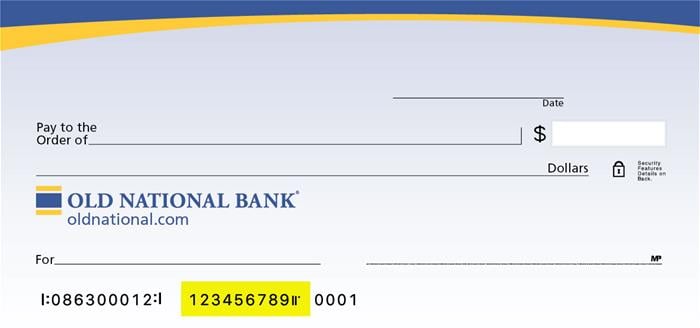
- At the bottom of a physical check or the bottom of a check image within Online Banking. You will see three sets of numbers at the bottom of the check. Your account number is the center set of 7-10 numbers. (Note that the set of numbers on the left, 086300012, is the Old National routing number.)
Visit any Old National banking center for assistance.