Best Matches
How to Order (or Reorder) Checks
Order checks in several convenient ways: by phone, on the web, at a Banking Center, via Client Care, or through Online Banking (reorders only). Click to get started.
2,220 results found
-
Moving to a New State? 3 Financial Factors You Need to Consider
The pandemic changed work patterns for many Americans. Due to the ability for many to work remotely, a new report from Upwork found that 2.4% of people, or 4.9 million Americans, have already moved because of remote work since 2020.
-
Three Ways Business Owners Can Evaluate Financial Risk
Financial risk can come in many forms. It could be an outside party that gains access to your bank account or a lawsuit that could bankrupt your
-
What To Look For When Opening A Bank Account For Your Teen
Whether your teen is just starting to earn their own cash or wants to save for something epic, understanding what to look for can make all the difference.
-
How do you write a check?
To write your check, fill out the fields carefully and sign at bottom right. We’ve included a properly filled out check below, as an example.
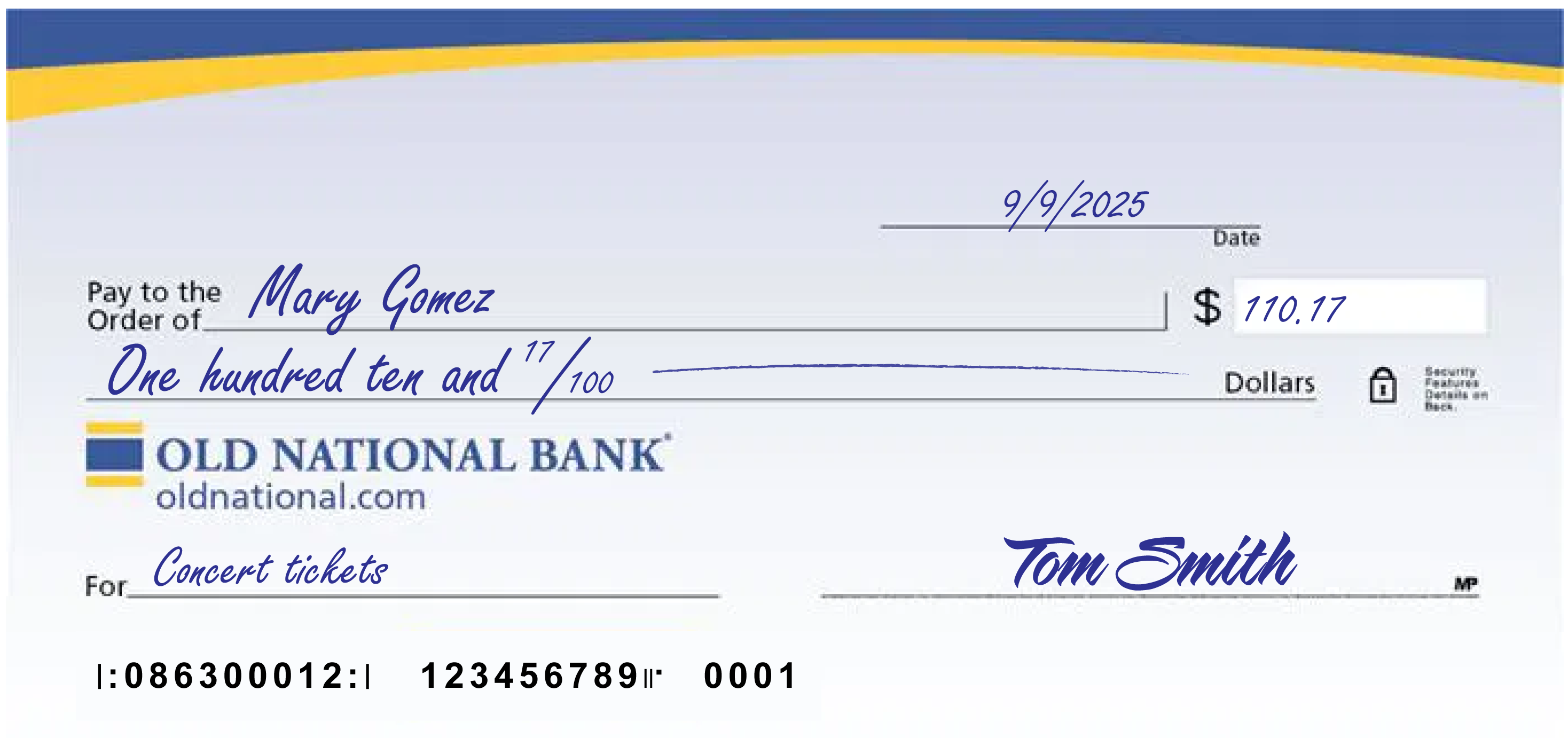
A few notes:
- The date at the upper right can be any standard format that includes the day, month and year.
- Write the full name of the person, business entity, or organization who is receiving the check in the “Pay to the Order of” field.
- The box at the right is for a numerical representation of the amount you’d like to pay the recipient.
- The line with “dollars” at the end is where you write out the amount you’d like to pay the recipient in words; write the cents as a fraction XX/100; if there’s extra space, draw a line until “dollars” so that no one can adjust the amount you wrote.
- The lower left field is for personal notes; this is optional. Some people like to write what the check is for, so they can remember when reviewing their records; If you’re paying a specific bill, you may be asked to write your invoice number or other identifying information you have on record with the company you’re paying.
- Sign the check at lower right with the signature that you use for all important documents.
- If you make a mistake on your check, you can cross it out and put your initials next to it and then write what you meant to write.
-
How can I get a copy of a check in Digital Banking?
Once a check you have written to make payment has cleared on your Old National checking account, you will automatically have an image of it within your Digital Banking transaction history.
On a web browser
- Sign in to Digital Banking, go to My Accounts and select the checking account the check was written on. Here you can narrow your search for the image of the check.
- Under Account History, set the date range when the check cleared your account.
- Next, under "Narrow by items containing," enter keywords to help you find a specific check. You can search by check payee, check number or check amount. You can also simply search by the word "check" to pull up all checks within your designated time frame.
Once you have located the check image you are searching for, you can select it to open an image of the front and back of the check. Above the check, to the right, is a printer icon you can use to print a copy of the check.
Mobile App
- Within the Mobile App, go to Accounts and select the checking account the check was written on.
- At the very top of the screen, you will see a Search box with the words Search transactions. Here you can enter the check number (if you know it). You can also simply enter the word "check," to pull up all checks that have cleared your account.
- When searching for a check image within your Mobile App, you will not have the option to search by date range or as far back as you can within Digital Banking.
- Once you find the check you are searching for in the Mobile App, tap it to open an image of the front of the check only.
- From here, you can view or take a screenshot of the check image.
If you have trouble locating your check image within Digital Banking, please contact Client Care at 1-800-731-2265.
-
3 mistakes that prevent you from hiring the best talent
The people you hire can make or break the company. That’s a lesson I learned early on. I also learned that making the right hiring decision is hard. There are no easy yes-or-no questions to filter out candidates. These challenges make it easy to fall back on feelings and intuition when it comes to hiring.
-
3 Things Retirees Need to Do Right Now to Prepare for a Second Coronavirus Wave
With COVID-19 cases rising across the country, there's not really much debate about whether the situation is getting worse or better in the United States. In fact, the only division among public health experts now is whether we're in a second wave, or whether the first wave never ended. Sadly, things are probably going
-
5 Ways To Get More Cash Flowing Into Your Business
Struggling to get customers to pay you? You’re not alone. A majority of small businesses around the world (61%) say they have problems with cash flow, and 32% can’t pay back vendors, make payments on loans, or pay themselves or make payroll because of cash-flow issues, according to “The State of Small Business Cash Flo
-
How to Use Rent Payments to Increase Your Credit Score
Are you one of the over 40 million people currently renting? Here’s a little secret: it can help improve your credit score. Like it or not, your credit affects just about every aspect of your financial life. Whether you’re trying to buy a house, a car — or even a fancy new phone, your credit score is the first thing le
-
Intriguing ESOP Benefits: Thoughts on Recent Research
ESOPs (Employee Stock Ownership Plans) are IRC section 401(a) qualified defined contribution plans which allow employees to own stock in the company for which they work. ESOPs may be sponsored by public companies or closely held corporations. According to The National Center for Employee Ownership (NCEO), there are ove