Best Matches
How to Order (or Reorder) Checks
Order checks in several convenient ways: by phone, on the web, at a Banking Center, via Client Care, or through Online Banking (reorders only). Click to get started.
2,220 results found
-
Intriguing ESOP Benefits: Thoughts on Recent Research
ESOPs (Employee Stock Ownership Plans) are IRC section 401(a) qualified defined contribution plans which allow employees to own stock in the company for which they work. ESOPs may be sponsored by public companies or closely held corporations. According to The National Center for Employee Ownership (NCEO), there are ove
-
4 Ways To Protect Your Retirement Income When Markets Are Volatile
If you’re worried about stock market volatility and how to protect your retirement savings so it lasts for the rest of your potentially long life, I have some advice for you: Don’t spend your retirement savings! Instead, use your savings to set up “retirement income generators,” or RIGs for short, to generate regular l
-
How do you write a check?
To write your check, fill out the fields carefully and sign at bottom right. We’ve included a properly filled out check below, as an example.
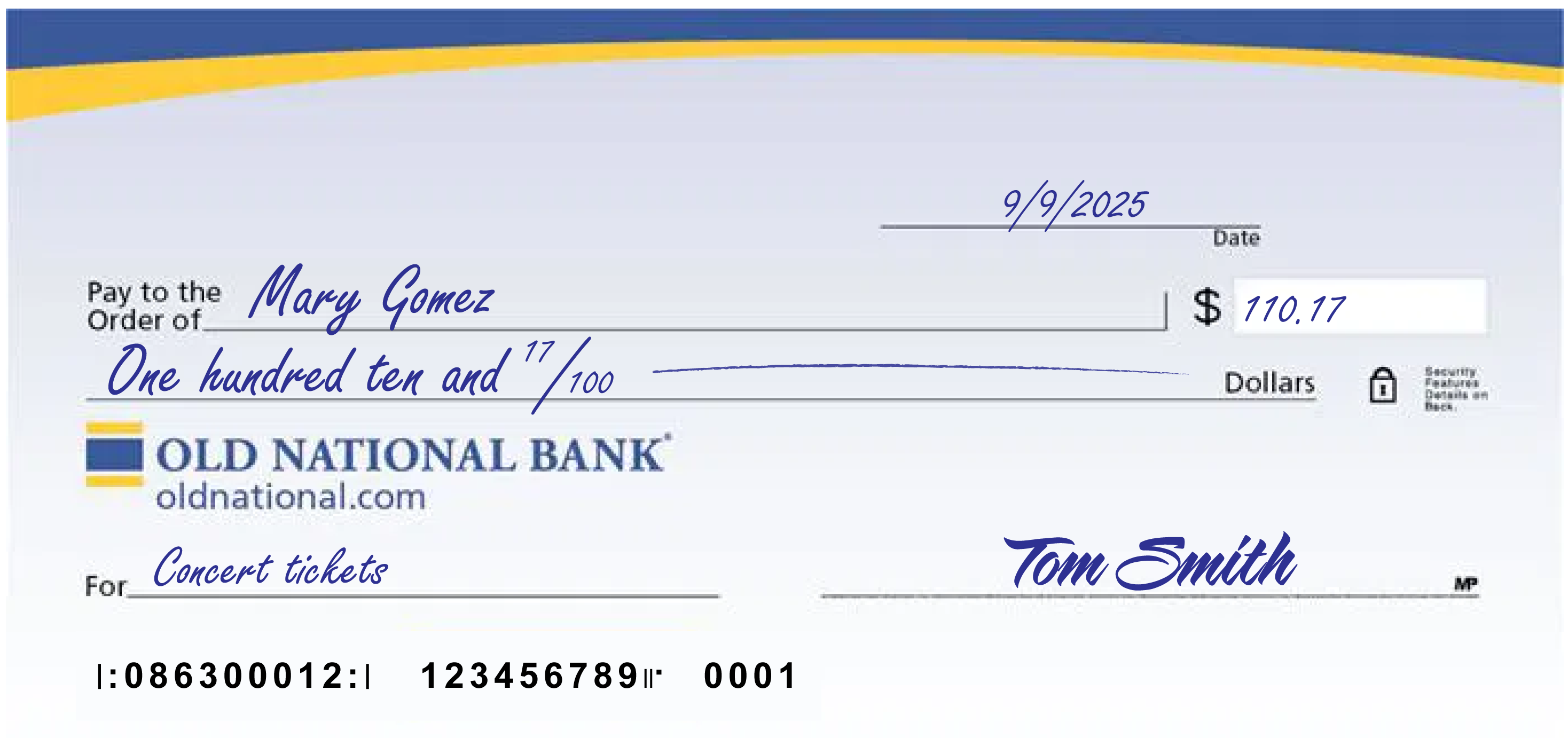
A few notes:
- The date at the upper right can be any standard format that includes the day, month and year.
- Write the full name of the person, business entity, or organization who is receiving the check in the “Pay to the Order of” field.
- The box at the right is for a numerical representation of the amount you’d like to pay the recipient.
- The line with “dollars” at the end is where you write out the amount you’d like to pay the recipient in words; write the cents as a fraction XX/100; if there’s extra space, draw a line until “dollars” so that no one can adjust the amount you wrote.
- The lower left field is for personal notes; this is optional. Some people like to write what the check is for, so they can remember when reviewing their records; If you’re paying a specific bill, you may be asked to write your invoice number or other identifying information you have on record with the company you’re paying.
- Sign the check at lower right with the signature that you use for all important documents.
- If you make a mistake on your check, you can cross it out and put your initials next to it and then write what you meant to write.
-
How can I get a copy of a check in Digital Banking?
Once a check you have written to make payment has cleared on your Old National checking account, you will automatically have an image of it within your Digital Banking transaction history.
On a web browser
- Sign in to Digital Banking, go to My Accounts and select the checking account the check was written on. Here you can narrow your search for the image of the check.
- Under Account History, set the date range when the check cleared your account.
- Next, under "Narrow by items containing," enter keywords to help you find a specific check. You can search by check payee, check number or check amount. You can also simply search by the word "check" to pull up all checks within your designated time frame.
Once you have located the check image you are searching for, you can select it to open an image of the front and back of the check. Above the check, to the right, is a printer icon you can use to print a copy of the check.
Mobile App
- Within the Mobile App, go to Accounts and select the checking account the check was written on.
- At the very top of the screen, you will see a Search box with the words Search transactions. Here you can enter the check number (if you know it). You can also simply enter the word "check," to pull up all checks that have cleared your account.
- When searching for a check image within your Mobile App, you will not have the option to search by date range or as far back as you can within Digital Banking.
- Once you find the check you are searching for in the Mobile App, tap it to open an image of the front of the check only.
- From here, you can view or take a screenshot of the check image.
If you have trouble locating your check image within Digital Banking, please contact Client Care at 1-800-731-2265.
-
Transforming Cash Flow Management: The Impact of Real-Time Data Analytics on Small Business Growth
Practically every business needs to practice real-time data analytics to not just survive but thrive in the modern market. After all, information is
-
Entrepreneurs are Desperate to Switch to Digital Payments. Here’s What’s Stopping Them, Mastercard Says.
Even Gen Z finds it difficult to convince legacy businesses to stop requiring cash and check payments.
-
How do I download and install the Old National Mobile Banking App?
To find and download the Mobile App, just follow these steps.
- Depending on your device type, visit the App Store, Google Play or the Amazon Appstore.
- The above links should take you to the Mobile App. If not, search for Old National Mobile.
- Download the Mobile App to your phone or other device.
- Once downloaded, log in using your Digital Banking User ID and Password.
- You will be prompted to verify your identity using the phone number already registered in your Digital Banking.
You can also follow our brief tutorials:
For the App Store:
For Google Play:Learn more about the Mobile Banking App.
With the Mobile App, you can do the following and more:
- Check balances
- Transfer funds
- Pay bills
- Locate branches and ATMs
- Deposit checks
- Enroll in and view eStatements
- Access our Money Management personal financial management tool
- Access Mortgage Manager
There is no charge for use of the Mobile App.
If you need assistance with downloading the Mobile App, please call Client Care at 1-800-731-2265.
-
Forget the Debt Snowball: Here's a Better Way to Pay Off Your Debt
Are you looking for a way to pay off your debt? Here are some tips on why the avalanche method may be a better way to become debt-free
-
Common Scams That Target Small Businesses
Small businesses are the backbone of the American economy, but they are also prime targets for scammers. Why? Because small businesses often don’t
-
Money Safety for Seniors: tips for protecting yourselves and young ones
Anyone can be a victim of financial fraud and abuse, but scammers often target the elderly and those with fixed incomes. Known as elder fraud or elder