Best Matches
Personal Savings Accounts
Compare the benefits of Old National Bank savings accounts to find the right option. Convenient savings, money markets, IRAs, and CD accounts are available.
2,505 results found
-
SBA Financing: A Guide for Small Businesses
SBA Financing: A Guide for Small Businesses Understanding the Benefits and Process. SBA loans are designed to assist small businesses
-
Should I Make A S-Corporation Election?
S-Corp ElectionRido81The first tax deadline for S-Corporations and Partnerships is next week, and I’m fielding a lot of questions around the S-Corporation election. Many small business owners think or have been told that the S-Corp election is the way to reduce taxes for your business, because it gives you the ability
-
Should You Get a Home Warranty?
Thinking of buying a home warranty to offset potential appliance repairs? Read on to determine whether it's the right choice for you
-
How can I send a wire transfer?
To send money to both personal and business accounts in the US and internationally, visit your nearest Old National Banking Center.
To learn more about domestic and international wires, including wire transfer fees, visit our Business Wire Transfers page or our Personal Wire Transfers page.
-
What is a line of credit loan?
A line of credit loan is a flexible loan that allows you to borrow what you need, as you need it, up to a set credit limit. As long as you follow your repayment terms, the loan remains open and you can borrow again. The most common example is a credit card, where you can continue to use it month after month, provided your account is in good standing. Other examples include Home Equity Lines of Credit (HELOCs) and revolving lines of credit for businesses.
The contrasting loan type is a fixed loan, where you’re given a set amount of funds upfront, with the expectation that you repay the loan amount with interest over a set period of time. Once you’ve paid off the loan, there’s no opportunity to borrow again; you’d need to reapply for another loan. Common examples include mortgages, car loans and personal loans.
-
How do you write a check?
To write your check, fill out the fields carefully and sign at bottom right. We’ve included a properly filled out check below, as an example.
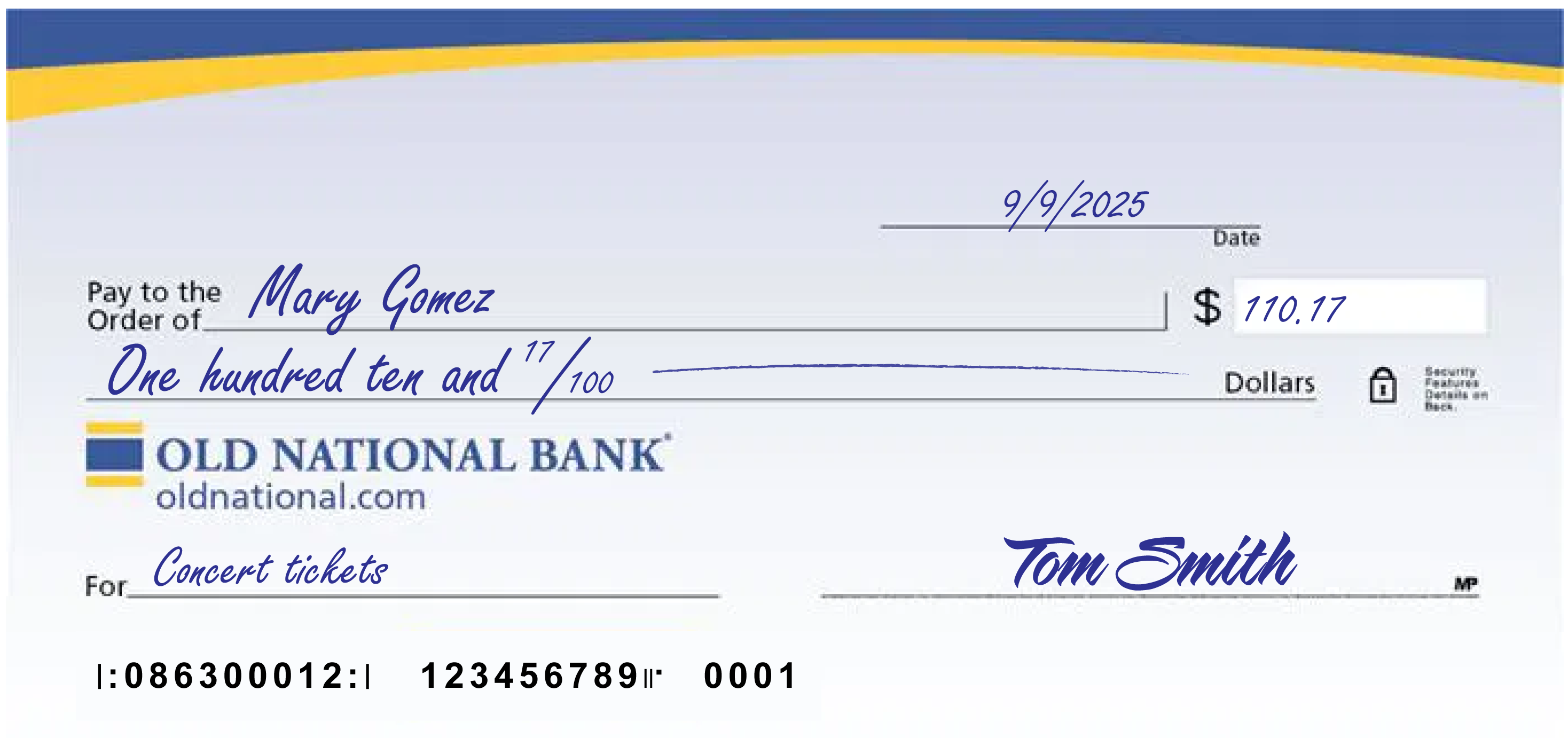
A few notes:
- The date at the upper right can be any standard format that includes the day, month and year.
- Write the full name of the person, business entity, or organization who is receiving the check in the “Pay to the Order of” field.
- The box at the right is for a numerical representation of the amount you’d like to pay the recipient.
- The line with “dollars” at the end is where you write out the amount you’d like to pay the recipient in words; write the cents as a fraction XX/100; if there’s extra space, draw a line until “dollars” so that no one can adjust the amount you wrote.
- The lower left field is for personal notes; this is optional. Some people like to write what the check is for, so they can remember when reviewing their records; If you’re paying a specific bill, you may be asked to write your invoice number or other identifying information you have on record with the company you’re paying.
- Sign the check at lower right with the signature that you use for all important documents.
- If you make a mistake on your check, you can cross it out and put your initials next to it and then write what you meant to write.
-
What is a secured credit card?
A secured credit card is a special type of credit card that allows users with no credit (or poor credit) to build (or repair) their credit score.
It works like this: The cardholder puts down a cash deposit as collateral to “secure” the card. The amount of cash put down is typically the cardholder’s credit limit. The cardholder then uses the card normally and their activity is reported to credit agencies, as it would be for any credit card.
As a result, the cardholder has the opportunity to build (or repair) their credit by making regular, on-time payments, among other things.
At Old National Bank, we offer two secured credit card options.
-
Q&A on Credit and Debt
Have questions about credit? The Old National credit and debt Q&A can help. Learn about using credit cards, credit scores, repairing credit and more.
-
An Oasis in a ‘Banking Desert’
What happens in a “banking desert”? Defined as an area lacking traditional financial services, sometimes without a banking center located in a
-
5 Reasons You Need a Financial Plan
A documented, living and accessible plan makes it more likely you’ll pursue the financial future you want.