Best Matches
Personal Savings Accounts
Compare the benefits of Old National Bank savings accounts to find the right option. Convenient savings, money markets, IRAs, and CD accounts are available.
2,486 results found
-
Everyday Checking Features and Benefits
Open an Everyday Checking account. No monthly fee when you meet basic requirements. Mobile deposit, Bill Pay, Zelle. Earn up to $600 bonus for new customers.
-
Student Checking Account
Open an Old National student checking account with no monthly service fee or minimum balance. Bank online, use Zelle, and access 55,000+ Allpoint ATMs.
-
Classic Checking Account
Open an Old National Classic Checking account for clients 50+ with tiered interest, standard checks, digital banking tools, and ways to waive monthly fees.
-
What to Look For in a Business Banking Account
a Small Business owner should know about reaping the benefits of the right account type. Most focus on business plan and overlook a bank relationship
-
Do you offer a checking account for seniors?
Yes. Our Old National Classic Checking is especially for clients age 50 and better. Here are some of the benefits:
- Earn interest with tiered rates
- Receive complimentary Old National standard checks or 25% off other styles
- Have check images mailed with statements or view online images with eStatements
- Pay no monthly service charge if you complete qualifying banking activities each month or maintain a minimum balance of $750 or a combined balance of $5,000 in checking, savings or money market accounts.
To learn more or open an Classic Checking account, visit your nearest banking center, call us at 1-800-731-2265 or open your account online.
You can also visit our Classic Checking page for more information.
-
A CD ladder spreads your savings
CD ladder spreads savings across multiple CDs with different maturity dates, offering predictable returns, CD ladder grow savings, offer liquidity, access
-
Christmas Savings Club
Get motivated to save for the holidays! The Old National Christmas Savings Club account has tiered interest, no minimum balance, and no monthly service charge.
-
Can my mortgage payment automatically be drafted from my checking or savings account?
Yes, mortgage payments can be automatically drafted by signing up for our Autopay service or Flexible Payments (Biweekly Drafting) service within Mortgage Manager.
With Autopay, your mortgage payment draft will occur on the specified date each month or the next business day if the specified day is a non-business day.
With Flexible Payments, a borrower is allowed to make half-payments every two weeks and apply these payments as a full monthly payment once a month.
The following information will help you in setting up automatic payments:
- Enroll in Autopay - How to Enroll in Autopay guide
- Set up Flexible Payments - To learn more on how to enroll contact Mortgage Servicing at 1-866-853-3277.
While Mortgage Manager is the simplest way to set up automatic payments, you can also download and return the Mortgage Loan Auto Pay form. This form can be returned to a banking center, mailed to PO Box 3789, Evansville, IN 47736 or emailed to mortops@oldnational.com to set up automatic payments.
If you need assistance setting up an automatic loan payment or want us to mail an auto pay form to you, please contact Mortgage Servicing at 1-866-853-3277 or visit any Old National banking center.
-
How Much Should You Put Into Your Savings Account? Here's One Way to Decide
How much money should you keep in savings depends on your financial needs. Here are three steps to determine what's right for you
-
Where can I find my Old National checking or savings account number?
Within Online Banking, your full account number can be found through the following steps:
- After you log in to Online Banking, click on the account name for which you want an account number. Please remember that your account number will be different for each account.
- Clicking on the account name will take you to the Account History page. On this page, click on Account Details to reveal more information about your account. Your full account number is the ACH number.
- On the bottom right of the account details, you can print your account detail information or click the X to close the account details.
You can also find your full checking number in the following ways:
- On a mailed statement or eStatement within Online Banking. Your account number is on the upper right corner of the statement.
- At the bottom of a physical check or the bottom of a check image within Online Banking. You will see three sets of numbers at the bottom of the check. Your account number is the center set of 7-10 numbers. (Note that the set of numbers on the left, 086300012, is the Old National routing number.)
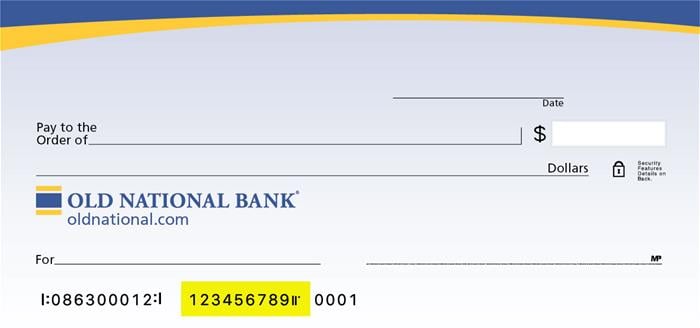
Visit any Old National banking center for assistance.