Best Matches
How to Order (or Reorder) Checks
Order checks in several convenient ways: by phone, on the web, at a Banking Center, via Client Care, or through Online Banking (reorders only). Click to get started.
2,220 results found
-
Buy, Hold or Sell? 3 Factors to Help You Make the Right Decision
In business, there's an adage that it takes money to make money. That sounds simple enough, but real business is far more nuanced than that.
-
Coronavirus Withdrawals From An IRA Or 401(k): Who Can, And Should, Tap Retirement Accounts?
Part of the CARES Act allowed individuals to tap IRAs or 401(k) retirement plans if they were impacted by the coronavirus and needed cash. The law permits withdrawals up to $100,000 (or the account balance, if lesser), without penalty. The funds can be paid back, though it’s optional. For struggling business owners and
-
Expand to a Storefront or Office Space? How to decide when to Expand Your Business
How to Decide When to Get a Storefront or Expand to a Storefront or Office Space? when to Expand Your Business
-
Lump Sum or Not: What’s the Best Way to Invest Your Year-End Bonus?
Many corporate executives recently received their 2020 performance bonus. Others, especially at many large companies, will get them over the coming weeks. While the downturn in last year’s economy may have cut into these annual awards for some, others will receive tens, perhaps hundreds of thousands of dollars. So, whe
-
To Expand Or Not To Expand: Four Considerations For Growing Companies
-
When Choosing Joint Or Separate Bank Accounts, Here Are Some Key Considerations
Financial management is one of marriage’s most critical yet tricky parts. How you and your spouse handle money can significantly affect how you get along.
-
How can I find a certain Old National banking center or ATM?
There are several ways to find an Old National banking center or ATM through our website and our Mobile App:
On the website
Visit oldnational.com/locations to go to our Branch & ATM locator page. Enter the following information into the Search box.- To find a specific location, including hours, enter address (as much as you know), city and state of the location you are searching for. Select Search.
- To find the banking center or ATM closest to your current location, enter your location and choose Search. A listing of your nearest banking centers and ATMs will be provided. You can also choose to Get Directions.
In the Mobile App
- Open the App on your device. You do not have to log in. At the bottom of the Login screen, select Locations. You can use the Search at the top of the screen to find a branch or ATM by address, zip code or city.
- If you are already logged in to the Mobile App, go to More at the bottom right of the screen and then Locations under Contact Us.
Results of Location searches will be more accurate if you have enabled your mobile device to show your current location.
-
Can I use ATMs that are not Old National or Allpoint ATMs?
Yes. Your Old National ATM/debit card will work at all ATMs. However, doing so may result in several fees.
Surcharge fees
Out of network ATMs (ones that are neither Old National nor Allpoint) may assess you a surcharge fee. An ATM surcharge fee is the fee an owner of an ATM charges cardholders from other financial institutions who use their machine. In other words, if you have an Old National debit card and use it at another bank's ATM, that bank may assess a surcharge.Foreign fees
For most types of checking accounts, Old National will charge a $3.00 "foreign" ATM fee (on top of any ATM owner surcharge) if you use a non-Old National Bank or non-Allpoint ATM.To ensure fee-free ATM usage, we recommend always using an Old National or Allpoint ATM when possible. To find an Old National or Allpoint ATM, go to our website locator at oldnational.com/locations. Select the "ATM" and "Allpoint Surcharge-Free ATM" filters. You can also use the locator within our Mobile App to find both Old National and Allpoint ATMs.
-
Where can I find my Old National checking or savings account number?
Within Online Banking, your full account number can be found through the following steps:
- After you log in to Online Banking, click on the account name for which you want an account number. Please remember that your account number will be different for each account.
- Clicking on the account name will take you to the Account History page. On this page, click on Account Details to reveal more information about your account. Your full account number is the ACH number.
- On the bottom right of the account details, you can print your account detail information or click the X to close the account details.
You can also find your full checking number in the following ways:
- On a mailed statement or eStatement within Online Banking. Your account number is on the upper right corner of the statement.
- At the bottom of a physical check or the bottom of a check image within Online Banking. You will see three sets of numbers at the bottom of the check. Your account number is the center set of 7-10 numbers. (Note that the set of numbers on the left, 086300012, is the Old National routing number.)
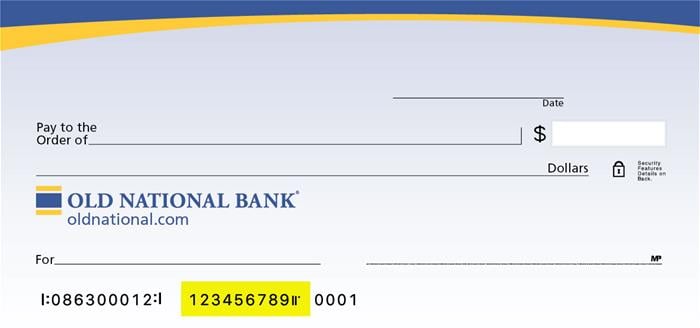
Visit any Old National banking center for assistance.
-
How do I change the address, phone number or email address on my account?
To change your mailing address, Old National offers several options:
- Please call 800-731-2265 Monday – Friday 7am to 6pm CST or on Saturday from 7am till noon CST.
- You may visit any Old National banking center and provide an updated photo ID or utility bill that contains the new address.
- Download a Personal Address Change Form or Business Address Change Form that you can mail to Old National.
To change your phone number or email address:
- Within Online Banking, go to My Settings and click Edit next to either your phone number or email address to update this information.
- You may also visit any Old National banking center or call Client Care at 1-800-731-2265.
Please note that changes can only be applied to the information for the person requesting the change. If there are additional people listed on the account, those individuals will need to request updates for their own information.