Search for https://www.galaxus.ch/en/sector/showdiscussion/www-snapchat-hack-visit-kunghaccom-srjcno2j-227651
475 results found
-
How can I find a certain Old National banking center or ATM?
There are several ways to find an Old National banking center or ATM through our website and our Mobile App:
On the website
Visit oldnational.com/locations to go to our Branch & ATM locator page. Enter the following information into the Search box.- To find a specific location, including hours, enter address (as much as you know), city and state of the location you are searching for. Select Search.
- To find the banking center or ATM closest to your current location, enter your location and choose Search. A listing of your nearest banking centers and ATMs will be provided. You can also choose to Get Directions.
In the Mobile App
- Open the App on your device. You do not have to log in. At the bottom of the Login screen, select Locations. You can use the Search at the top of the screen to find a branch or ATM by address, zip code or city.
- If you are already logged in to the Mobile App, go to More at the bottom right of the screen and then Locations under Contact Us.
Results of Location searches will be more accurate if you have enabled your mobile device to show your current location.
-
How can I make a payment on my Old National mortgage loan?
Use Mortgage Manager within Online and Mobile Banking to make a payment. Our guide for Accessing Mortgage Manager through Online and Mobile can help you get started. Once you have accessed Mortgage Manager, there are several ways to make payments explained in the following guides:
- Make a One-Time Payment - How to Make a Mortgage Payment guide
- Enroll in Autopay - How to Enroll in Autopay guide
- Set up Flexible Payments - To learn more on how to enroll contact Mortgage Servicing at 866-853-3277.
Here are several other options for making mortgage payments:
- Visit any Old National banking center to make a payment.
- Mail a check to:
PO Box 3789
Evansville, IN 47736 - Not using Mortgage Manager? Use the Mortgage Loan Auto Pay form to set up automatic payments on a mortgage.
- Pay by phone by calling Mortgage Servicing at 866-853-3277. (A fee will be associated if you pay by phone.) Payments made by phone can only be accepted as an electronic check (eCheck) and not by credit card or debit card. You will need your routing number and account number to pay by eCheck.
If you need assistance with any of the above payment options, please contact Mortgage Servicing at 866-853-3277.
-
Should I notify Old National if I plan to use my debit card while traveling?
Yes, if you will be using your debit card in areas where you do not typically travel, you should call Old National Client Care at 1-800-731-2265 or visit any Old National banking center to notify us of your travels before you leave. This will prevent your card from being blocked as a precaution due to unusual activity.
You can also add a travel memo to your card in online/mobile banking by selecting your debit card, then selecting “Manage Card”, then “Manage Travel Plans".
Mastercard® continues to monitor your debit card for suspicious or fraudulent activity while you are traveling. They may attempt to contact you to verify activity on the card, so be prepared to respond to such a call.
It is also a good idea to take phone numbers with you in case you need to report a lost or stolen debit card. You can report a lost or stolen card 24-hours a day by calling 1-800-731-2265 in the US or 1-812-422-2197 from outside of the US.
If you have questions about using your debit card while traveling, please contact Client Care at 1-800-731-2265.
-
How can I find the phone number for a certain Old National branch?
There are several ways to find the direct phone number for an Old National banking center by using our website locator or our Mobile App:
On the website
Visit oldnational.com/locations to go to our Branch & ATM locator page. Enter the following information into the Search box.- To find a specific location, including phone number, enter the address (as much as you know), city and state of the location you are searching for. Select Search.
- A listing of locations will be provided, and each location will include the direct phone number.
In the Mobile App
- Open the App on your device. You do not have to log in. At the bottom of the Login screen, select Locations. You can use the Search at the top of the screen to find a branch or ATM by address, zip code or city.
- If you are already logged in to the Mobile App, go to More at the bottom right of the screen and then Locations under Contact Us.
- Tap the map pin for the location you are searching for. Then tap the white box that appears to see the location phone number.
Results of Location searches will be more accurate if you have enabled your mobile device to show your current location.
-
How can I make a mortgage payment in Mortgage Manager?
You can use Mortgage Manager to make your mortgage payment within Online and Mobile Banking. Our guide for Accessing Mortgage Manager through Online and Mobile can help you get started. Once you have accessed Mortgage Manager, there are several ways to make payments explained in the following guides:
- Make a One-Time Payment - Mortgage Manager: How to Make a Mortgage Payment guide
- Enroll in Autopay - How to Enroll in Autopay guide
- Set up Flexible Payments - To learn more on how to enroll contact Mortgage Servicing at 1-866-853-3277.
Here are several other options for making mortgage payments:
- Visit any Old National banking center to make a payment
- Mail a check to PO Box 3789, Evansville, IN 47736
- Not using Mortgage Manager? Use the Mortgage Loan Autopay form to set up automatic payments on a mortgage
- Pay by phone by calling Mortgage Servicing at 1-866-853-3277. (A fee will be associated if you pay by phone.) Payments made by phone can only be accepted as an electronic check (eCheck) and not by credit card or debit card. You will need your routing number and account number to pay by eCheck.
If you need assistance with any of the above payment options, please contact Mortgage Servicing at 1-866-853-3277.
-
Where can I find my Old National checking or savings account number?
Within Online Banking, your full account number can be found through the following steps:
- After you log in to Online Banking, click on the account name for which you want an account number. Please remember that your account number will be different for each account.
- Clicking on the account name will take you to the Account History page. On this page, click on Account Details to reveal more information about your account. Your full account number is the ACH number.
- On the bottom right of the account details, you can print your account detail information or click the X to close the account details.
You can also find your full checking number in the following ways:
- On a mailed statement or eStatement within Online Banking. Your account number is on the upper right corner of the statement.
- At the bottom of a physical check or the bottom of a check image within Online Banking. You will see three sets of numbers at the bottom of the check. Your account number is the center set of 7-10 numbers. (Note that the set of numbers on the left, 086300012, is the Old National routing number.)
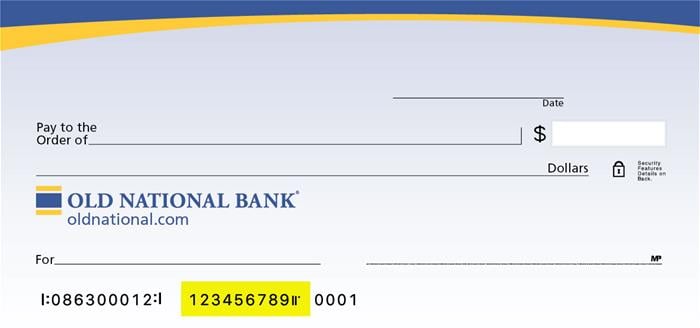
Visit any Old National banking center for assistance.
-
3 Reasons Why 2022 Might Be the Year to Sell Your Business
After 2 years of pandemic uncertainty, markets are settling down For small business owners, the past two years have been a rollercoaster ride of Covid
-
4 Ways to Reduce Your Business Expenses
Reducing business expenses without affecting the quality of your product or service can be a real challenge. At the same time, small businesses that
-
The Economy Is Going Well Now, But Questions About The Longer Run Remain
As the economy roars back from the pandemic’s lockdowns and quarantines, its near-term prospects look marvelously bright in just about every sector – employment and retail, capital spending and housing.
-
What recession? Pessimism recedes for global economy in 2020.
Slowing growth and trade tensions were seen a few months ago as major threats to the global economy. The outlook has shifted notably. A nuanced optimism has crept into the stock markets and forecasts about the world economy. Where traders and economists once predicted a U. S. recession in 2020 or certainly by 2021, man