Best Matches
Checking Account Bonus Offer
Earn up to a $600 checking bonus when you open an Old National Everyday or Preferred Checking account and complete qualifying direct deposits.
Personal Checking Accounts
Compare Old National checking accounts. Find the option for your needs. Accounts include online and mobile banking. Online account opening is available.
2,495 results found
-
How do I read my checking or savings account statement?
The following step-by-step guides provide a description for each section of your checking, savings or combined statement.
If you have additional questions after reviewing these guides, please visit any Old National banking center or call Client Care at 1-800-731-2265.
-
Personal Banking Accounts Online
Compare Old National Bank savings accounts, money markets, CDs, and IRAs. Find the right rate for you. Open your account online to pursue your financial goals.
-
Small Business Savings Accounts & CDs
Compare Old National small business savings accounts, money markets, and CDs. Earn tiered interest with no monthly fee at $500 balance. Open an account today.
-
Kids Savings Account
Open an Old National Kids Start Savings account with $50. For children 18 and under, it earns tiered interest with no minimum balance or monthly fee.
-
What to Look For in a Business Banking Account
a Small Business owner should know about reaping the benefits of the right account type. Most focus on business plan and overlook a bank relationship
-
View Savings Rates & APYs
Compare savings rates at Old National Bank. Earn up to 4.00% APY on CDs and up to 3.25% APY on Money Market accounts. View rates and open your account today.
-
Money Market Monitor Account
Earn tiered interest and access your money with Old National Bank’s Market Monitor money market account. Open with $50, avoid fees at $5,000, and explore current APY offers.
-
Where can I find my Old National checking or savings account number?
Within Online Banking, your full account number can be found through the following steps:
- After you log in to Online Banking, click on the account name for which you want an account number. Please remember that your account number will be different for each account.
- Clicking on the account name will take you to the Account History page. On this page, click on Account Details to reveal more information about your account. Your full account number is the ACH number.
- On the bottom right of the account details, you can print your account detail information or click the X to close the account details.
You can also find your full checking number in the following ways:
- On a mailed statement or eStatement within Online Banking. Your account number is on the upper right corner of the statement.
- At the bottom of a physical check or the bottom of a check image within Online Banking. You will see three sets of numbers at the bottom of the check. Your account number is the center set of 7-10 numbers. (Note that the set of numbers on the left, 086300012, is the Old National routing number.)
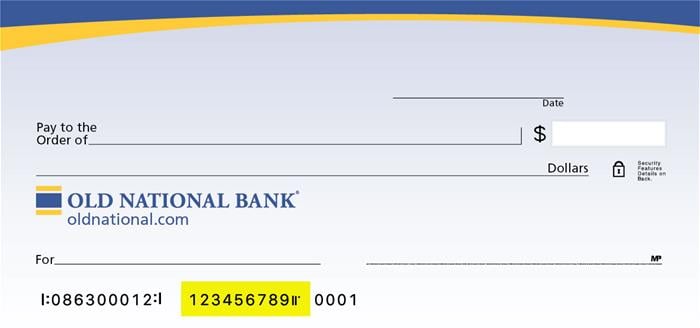
Visit any Old National banking center for assistance.
-
Buying Holiday Gifts Without Breaking the Budget
Using a savings account for holiday shopping without breaking the budget.
-
If I make a mortgage payment today, when will it be applied to my account?
If you submit your payment through Mortgage Manager prior to 9PM CT, it will be posted to your account on the same day.