Search for best cheap fc coins Visit Buyfc26coins.com Alennukset platina paketeista..0Y5R
111 results found
-
How can I make a payment on my Old National mortgage loan?
Use Mortgage Manager within Online and Mobile Banking to make a payment. Our guide for Accessing Mortgage Manager through Online and Mobile can help you get started. Once you have accessed Mortgage Manager, there are several ways to make payments explained in the following guides:
- Make a One-Time Payment - How to Make a Mortgage Payment guide
- Enroll in Autopay - How to Enroll in Autopay guide
- Set up Flexible Payments - To learn more on how to enroll contact Mortgage Servicing at 866-853-3277.
Here are several other options for making mortgage payments:
- Visit any Old National banking center to make a payment.
- Mail a check to:
PO Box 3789
Evansville, IN 47736 - Not using Mortgage Manager? Use the Mortgage Loan Auto Pay form to set up automatic payments on a mortgage.
- Pay by phone by calling Mortgage Servicing at 866-853-3277. (A fee will be associated if you pay by phone.) Payments made by phone can only be accepted as an electronic check (eCheck) and not by credit card or debit card. You will need your routing number and account number to pay by eCheck.
If you need assistance with any of the above payment options, please contact Mortgage Servicing at 866-853-3277.
-
Should I notify Old National if I plan to use my debit card while traveling?
Yes, if you will be using your debit card in areas where you do not typically travel, you should call Old National Client Care at 1-800-731-2265 or visit any Old National banking center to notify us of your travels before you leave. This will prevent your card from being blocked as a precaution due to unusual activity.
You can also add a travel memo to your card in online/mobile banking by selecting your debit card, then selecting “Manage Card”, then “Manage Travel Plans".
Mastercard® continues to monitor your debit card for suspicious or fraudulent activity while you are traveling. They may attempt to contact you to verify activity on the card, so be prepared to respond to such a call.
It is also a good idea to take phone numbers with you in case you need to report a lost or stolen debit card. You can report a lost or stolen card 24-hours a day by calling 1-800-731-2265 in the US or 1-812-422-2197 from outside of the US.
If you have questions about using your debit card while traveling, please contact Client Care at 1-800-731-2265.
-
How can I make a mortgage payment in Mortgage Manager?
You can use Mortgage Manager to make your mortgage payment within Online and Mobile Banking. Our guide for Accessing Mortgage Manager through Online and Mobile can help you get started. Once you have accessed Mortgage Manager, there are several ways to make payments explained in the following guides:
- Make a One-Time Payment - Mortgage Manager: How to Make a Mortgage Payment guide
- Enroll in Autopay - How to Enroll in Autopay guide
- Set up Flexible Payments - To learn more on how to enroll contact Mortgage Servicing at 1-866-853-3277.
Here are several other options for making mortgage payments:
- Visit any Old National banking center to make a payment
- Mail a check to PO Box 3789, Evansville, IN 47736
- Not using Mortgage Manager? Use the Mortgage Loan Autopay form to set up automatic payments on a mortgage
- Pay by phone by calling Mortgage Servicing at 1-866-853-3277. (A fee will be associated if you pay by phone.) Payments made by phone can only be accepted as an electronic check (eCheck) and not by credit card or debit card. You will need your routing number and account number to pay by eCheck.
If you need assistance with any of the above payment options, please contact Mortgage Servicing at 1-866-853-3277.
-
Where can I find my Old National checking or savings account number?
Within Online Banking, your full account number can be found through the following steps:
- After you log in to Online Banking, click on the account name for which you want an account number. Please remember that your account number will be different for each account.
- Clicking on the account name will take you to the Account History page. On this page, click on Account Details to reveal more information about your account. Your full account number is the ACH number.
- On the bottom right of the account details, you can print your account detail information or click the X to close the account details.
You can also find your full checking number in the following ways:
- On a mailed statement or eStatement within Online Banking. Your account number is on the upper right corner of the statement.
- At the bottom of a physical check or the bottom of a check image within Online Banking. You will see three sets of numbers at the bottom of the check. Your account number is the center set of 7-10 numbers. (Note that the set of numbers on the left, 086300012, is the Old National routing number.)
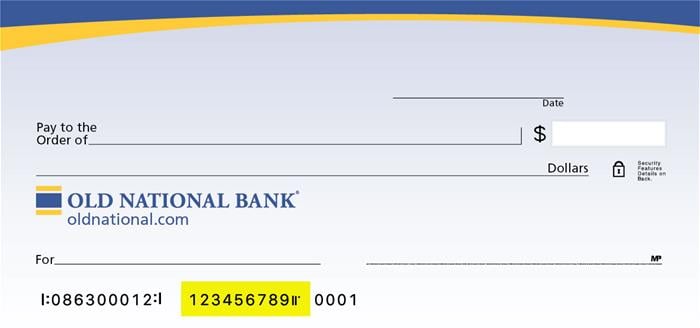
Visit any Old National banking center for assistance.
-
How do I place a stop payment on a check or pre-authorized payment?
Please be aware that a stop payment fee of $38 per item applies. You can submit a stop payment request in one of several ways:
- For checks, log in to Online Banking. Go to Additional Services and choose Stop Payment. Follow the on-screen instructions. You can also place a stop payment for a check within our Mobile App.
- For checks and electronic transactions, visit any Old National banking center or call Client Care at 1-800-731-2265.
- When requesting a stop payment, you will need to provide the date, the amount, and the number of the item, together with the name of the payee.
- Once a stop payment is placed, and the form has been signed (when applicable), stop payment orders remain effective for up to six (6) months from the date authorized.
- Please note, that even though a stop payment request goes into effect immediately, you may still see the transaction attempting to clear your account within Online Banking. If this happens, rest assured that the transaction will be returned during our nightly processing of accounts.
-
What are Card Controls and Alerts?
Card Controls and Alerts enable you to monitor and manage your debit card activity from within Online Banking and the Mobile App. There is no cost to use Card Controls.
Here are a few of the benefits of using Card Controls:
Monitor
Know exactly what is happening with your debit card, anytime and anywhere. Turn on alerts for Internet purchases, ATM transactions and more.Manage
Use Card Controls to immediately turn your debit card on or off in case it is misplaced or lost, or for any other reason. You can also set transaction limits, so all debit card transactions above a certain amount will be declined.Visit our Card Controls page for more information, including how to enroll.
Even if you use Card Controls to turn off your debit card, you should still contact us at 1-800-731-2265 to report any unauthorized activity.
Please note that Card Controls are for debit card transactions and HELOC cards only. They are not available for checks clearing or ACH transactions.
-
What offices have notaries?
We have associates who can notarize in every Old National office. This is a service we provide at no cost for Old National clients.
It is best to call ahead to make sure a notary is available. You can use our locator to find your nearest office, hours and phone number.You can also find locations and hours in our Mobile App. Just select Locations on the log in screen. Enter a zip code or city. Tap the purple pin of your desired banking center. Then tap the information icon (i in a circle) for the location phone number and hours.
-
What type of mortgage should I get?
As with all financial products, the right mortgage is dependent on your individual needs and situation. It’s best to talk with a mortgage expert to determine which type of mortgage will work for you.
Of course, that doesn’t mean you can’t educate yourself about the various types of mortgages that are available. You can start by viewing our many mortgage options.
We also have extensive information about mortgages and homebuying available in our Financial Insights.
-
Which branches have safe deposit boxes?
You can use the oldnational.com locator to see which of our banking centers have safe deposit boxes.
The listing will also provide a direct phone number for that branch. You can call that banking center to get additional information regarding box sizes, cost and current availability.
-
Can I use an Allpoint ATM branded by another financial institution?
Yes. Since Old National participates in the Allpoint Network, ATMs on the oldnational.com locator are guaranteed surcharge-free regardless of location branding. Allpoint ATMs should also have an Allpoint logo on them.