Search for fc 26 dollars Visit Buyfc26coins.com for latest FC 26 coins news..EQ3v
211 results found
-
How do I apply for a mortgage loan?
You can apply for an Old National mortgage loan in several ways:
Apply through our website
- Visit the Mortgage Loan Options page.
- If you prefer, you can also designate the mortgage lender you prefer to work with. In that case, go to the Mortgage Loan Options page and select Find a Mortgage Expert. Under the photo of the mortgage loan officer you prefer to work with, select Apply Online.
Call us
You can also contact a mortgage loan officer directly to schedule an appointment. Go to the Mortgage Loan Options page and select Find a Mortgage Expert. Under the photo of each mortgage loan officer, you will find a direct phone number. -
How can I get my 1098 tax information for my mortgage?
We will mail your 1098 tax information to the mailing address you have on file with us. Please be aware that lenders have until January 31 to mail 1098 documents. Old National does not currently provide access to 1098 documents online.
You can also view year-end tax information for your mortgage within Mortgage Manager.If you have not received or have misplaced your 1098, you can contact Client Care at 1-800-731-2265, Option 4, or visit any Old National banking center to request a copy.
-
Is there a charge to use Mortgage Manager?
Old National Mortgage Manager is a free service for Old National Mortgage clients. All you have to do is have Online Banking.
If you don't currently have Online Banking and want to enroll, see our FAQ: How do I enroll in Online Banking and Mobile Banking?
Please note that you will need your Mortgage Loan Account Number to get started in Mortgage Manager.
Visit our Mortgage Manager page to learn more and find guides for using Mortgage Manager.
-
How can I find an ATM?
There are several ways to find an Old National ATM through our website and our Mobile App:
On the website
Visit oldnational.com/locations to go to our Branch & ATM locator page. Enter the following information into the Search box.- To find an ATM near a specific location, enter the location address (as much as you know), city/state or zip code. Select Search.
- To find an ATM closest to your current location, enter your location and choose Search or just search for "Current Location." A listing of your nearest banking centers and ATMs will be provided. This listing will include branches with ATMs as well as standalone ATMs - some part of the Old National network and some part of the Allpoint network. You can also choose to Get Directions.
In the Mobile App
- Open the App on your device. You do not have to log in. At the bottom of the Login screen, select Locations. You can use the Search at the top of the screen to find an ATM by address, zip code or city.
- If you are already logged in to the Mobile App, go to More at the bottom right of the screen and then Locations under Contact Us.
Results of Location searches will be more accurate if you have enabled your mobile device to show your current location.
Deposits at ATMs
Old National has many ATMs that will accept cash and check deposits, and we continue to add more. To find an ATM that accepts deposits, follow these steps:- Go to the oldnational.com locator
- Next to the locator map, select the ATMs filter and unselect the Allpoint Surcharge-Free ATM filter. Our Partner ATMs, which are part of the Allpoint network, do not accept deposits.
- Type your zip code or city/state into the Search bar to find the nearest ATMs
Deposits made at an ATM are available for withdrawal based upon our typical funds availability policy. This means they may not be available for immediate withdrawal and use.
If you have questions about making deposits at an ATM, please contact Client Care at 1-800-731-2265.
-
How can I get a replacement for a broken or damaged debit card?
To order a replacement for a damaged debit card, call Client Care at 1-800-731-2265 or visit any banking center.
The normal timeframe for delivery is 7-10 business days. To receive a card sooner, you can instead choose to pay a $35 fee and receive the replacement card in two business days. The card must be ordered by 4pm on any business day for it to be delivered in two business days.
A Lost or Stolen Debit Card
If instead of a damaged debit card you need help with a lost or stolen card, please call us at 1-800-731-2265, option 2, in the US. You can report a lost or stolen card 24-hours a day. If you are outside of the US, call 1-812-422-2197. We can cancel or restrict your card, check for unauthorized transactions and order a new card for you. -
How do you write a check?
To write your check, fill out the fields carefully and sign at bottom right. We’ve included a properly filled out check below, as an example.
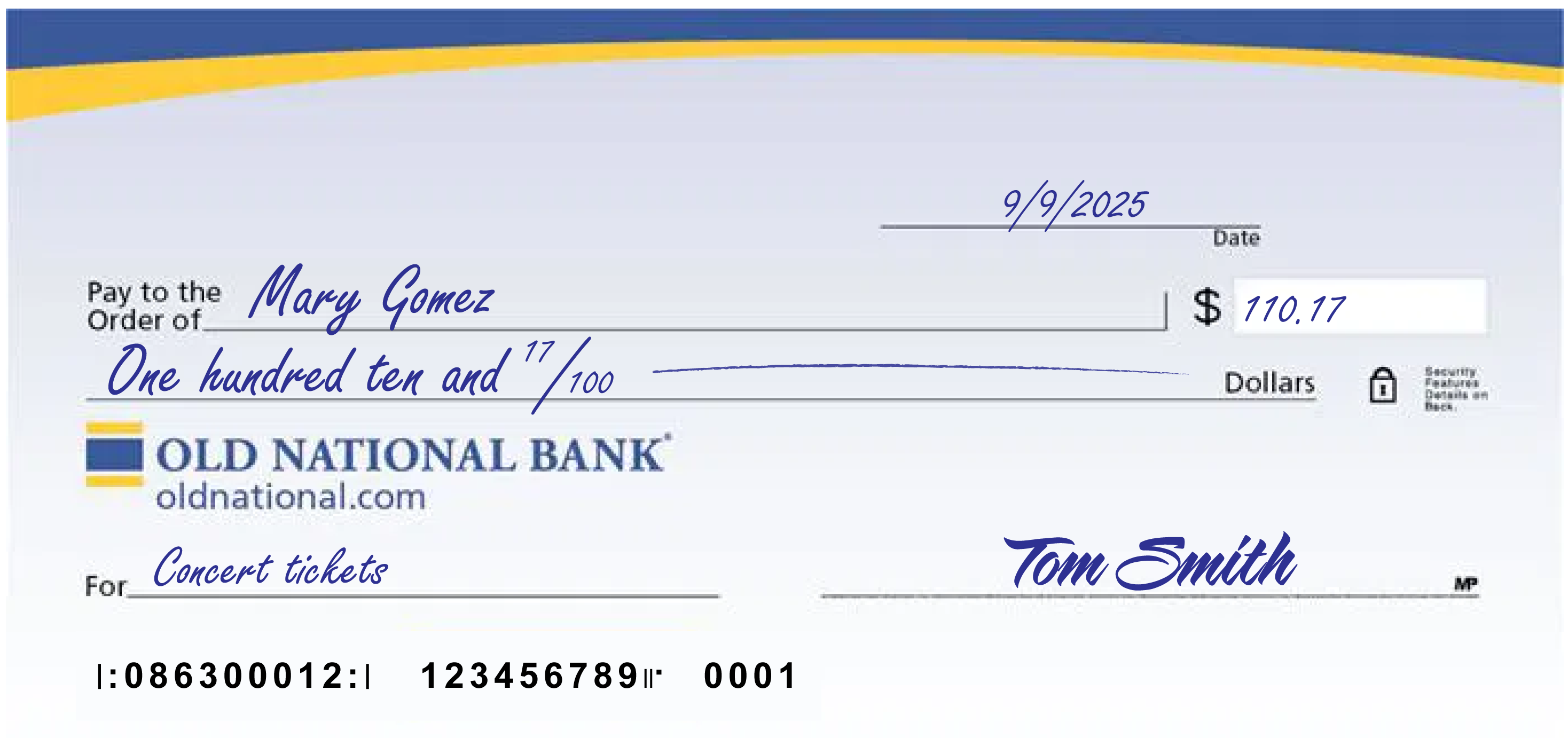
A few notes:
- The date at the upper right can be any standard format that includes the day, month and year.
- Write the full name of the person, business entity, or organization who is receiving the check in the “Pay to the Order of” field.
- The box at the right is for a numerical representation of the amount you’d like to pay the recipient.
- The line with “dollars” at the end is where you write out the amount you’d like to pay the recipient in words; write the cents as a fraction XX/100; if there’s extra space, draw a line until “dollars” so that no one can adjust the amount you wrote.
- The lower left field is for personal notes; this is optional. Some people like to write what the check is for, so they can remember when reviewing their records; If you’re paying a specific bill, you may be asked to write your invoice number or other identifying information you have on record with the company you’re paying.
- Sign the check at lower right with the signature that you use for all important documents.
- If you make a mistake on your check, you can cross it out and put your initials next to it and then write what you meant to write.
-
What should I do if I am having financial difficulties making my loan payment?
We are here to discuss any options available to you. Please contact our Client Care at 1-800-731-2265, Option 4.
For a mortgage loan, you can also explore your options by speaking to a housing counselor. To find a list of counselors in your area, visit the U.S. Department of Housing and Urban Development's website at https://hud.gov/offices/hsg/sfh/hcc/hcs.cfm or call 1-800-569-4287.
-
Do you have any guides to assist me with using Mortgage Manager?
We have several guides to walk you through step-by-step.
- How to Make a Mortgage Payment
- How to Sign Up for eStatements
- How to Enroll in Autopay
- How to Access Statements
- How to Access Online & Mobile
You will find additional information on the Mortgage Manager page.
If you have questions or need additional assistance, you can contact Mortgage Servicing at 1-866-853-3277 or visit any Old National banking center.
-
What types of business accounts do you offer?
Old National offers a wide range of business and commercial banking products including:
- Loans and lines of credit
- SBA loans
- Business credit cards
- Investment real estate
- Community development lending
- Business checking
- Online and mobile banking
- Treasury Management solutions and
- Merchant Services
We also provide products and services for your employees, such as Health Savings Accounts and retirement planning. Our Partnership Banking program offers special perks and services to help your employees save money and achieve their financial goals.
To learn more, please call us at 1-800-731-2265, stop by any banking center or visit the Business Banking Solutions page on our website.
-
Can I open a savings account online?
We do provide a way to open a basic savings account online. Go to our Personal Savings Accounts page. In the grid with our various types of accounts, go to Basic Savings and select the Open Now button.
We offer a variety of savings options to meet different goals. If you would like to talk to someone about the type of savings that would be best for you, please visit a banking center or call us at 1-800-731-2265.